The short answer
Pick Ollama if you want open source, a model server for code and other apps, Linux, Windows or Docker, or a Mac on macOS 14 or 15.
Pick Outmake if you want pictures, video, dictation and voices in the same app as chat, on macOS 26.
You can keep both. Outmake reads the models Ollama downloaded, so nothing downloads twice.
At a glance
| Outmake | Ollama | |
|---|---|---|
| Price | Free. No paid plan | Free on your Mac. Cloud plans from $20 a month [1] |
| Source code | Closed | Open, MIT licence, desktop app included [2] |
| Macs | Apple silicon, macOS 26 or later | macOS 14 or later. Intel Macs on the processor only [3] |
| Other systems | None | Windows, Linux and Docker [4] |
| Chat engines | llama.cpp (GGUF) | llama.cpp and MLX [5] |
| Pictures and video | Yes, made on your Mac | No. Picture making was removed in August 2026 [6] |
| Voices and dictation | Yes, in the app | Speech and transcription through its API [5][7] |
| Workflows | Yes, a canvas of steps | None found [4] |
| Server for other apps | No | Yes, OpenAI- and Anthropic-compatible [4] |
| Says if a model fits first | Yes, on every model | None found [7] |
| Usage data sent | On at setup outside the EU, UK and Switzerland, can be turned off | “Limited usage metadata”, its policy says [8] |
| Version read | 0.8.4, 3 Nov 2026 | 0.40.14, 3 Nov 2026 [5] |
How we compared them
Every Ollama statement here comes from Ollama’s website, documentation, GitHub releases and privacy policy, read on 5 November 2026 and linked in Sources. Outmake statements come from its release notes, help pages and privacy policy. The Outmake screenshots are from Dane’s MacBook Pro (M1 Pro, 16 GB).
We haven’t timed the same model in both on the same Mac yet, so this page makes no speed claim. Both run chat models on llama.cpp. The one size figure below is our own measurement on one Mac, and labelled so.
Ollama is an engine other software runs on
Ollama runs a server at 127.0.0.1:11434 that speaks the OpenAI and Anthropic APIs, which editors, chat apps and scripts send requests to. It has a command line, ollama run, and a desktop chat app [4]. ollama launch sets up coding agents such as Claude Code, Codex and OpenCode to use its models [7]. It runs on Linux and in Docker, so the same setup works on a server.
Outmake is an app you use directly. It has no server for other apps and no command line. Its chat engine listens only on your own Mac, with a key it makes at each launch, and only Outmake uses it.
Better for developers and for powering other apps: Ollama.
Ollama no longer makes pictures
Ollama added picture making on macOS as an experiment in January 2026 [9]. Version 0.32.6, on 4 August 2026, says “experimental image generation has been temporarily removed” [6], and it hadn’t returned by 0.40.14. Video isn’t in its documentation.
Outmake makes pictures with models such as FLUX, SDXL, Qwen-Image and Z-Image, edits them, and makes short videos with Wan and LTX, on your Mac. On a MacBook Pro with 16 GB, a two-second clip from Wan 2.2 14B took 12 minutes.
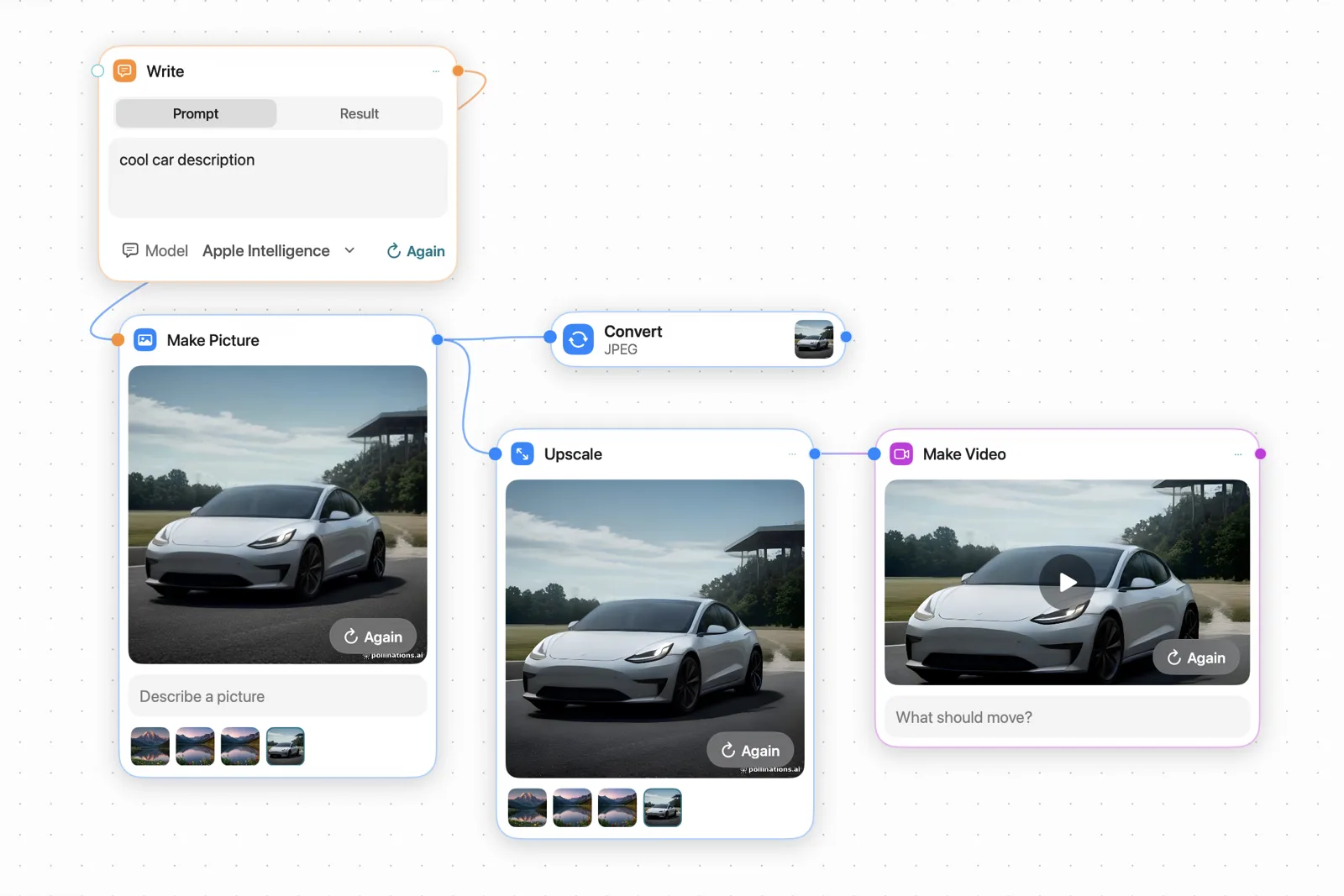
Better for pictures and video: Outmake.
Speech and dictation
Since 0.40.11, on 24 October 2026, Ollama on macOS can turn text into speech through an OpenAI-compatible endpoint, and 0.40.12 added transcription and translation through its API [5][7]. These are for code that calls Ollama; we found no dictation into other apps.
In Outmake, hold the right Option key to dictate into any app. It reads text aloud with voices such as Kokoro and Qwen3-TTS, and Meetings shows captions and a live translation during a call.
Better for speech in your own code: Ollama. For dictation and listening: Outmake.
Ollama is open source and runs on more Macs
Ollama is MIT-licensed, desktop app included, so anyone can read and build it [2]. It needs macOS 14, and it runs on Intel Macs using the processor alone [3].
Outmake is closed source, needs macOS 26 and Apple silicon. A Mac on Sonoma or Sequoia, or any Intel Mac, can’t run it.
Better for open source and older Macs: Ollama.
Outmake says whether a model fits before you download it
Every model in Outmake carries one of four labels for your Mac: Runs great, Runs well, Tight fit or Too big, worked out from its memory and what is running. We found no such check in Ollama’s documentation or release notes [7]; you pick a size from its library and see how it runs.
Better for knowing what your Mac can run: Outmake.
Privacy: both keep local chats on your Mac
Ollama’s privacy policy says “we don’t see your prompts or data when you run locally” and that it collects “limited usage metadata” [8]. Setting OLLAMA_NO_CLOUD=1 keeps it to local models [7].
Outmake’s Send Measurements and Errors starts on, except in the EU, the rest of the EEA, the UK and Switzerland. It sends your Mac’s chip and memory, model speeds, how often features are used and crash codes, and never what you type or get back. Setup shows the switch before anything is sent, and you can turn it off. The measured speeds are published at outmake.app/measurements.
Price and size
Both are free for models on your Mac. Ollama sells cloud plans: Pro at $20 a month and Team at $500 [1]. Outmake has no paid plan; cloud models such as Claude or ChatGPT are billed by those companies on your own plan.
Ollama doesn’t publish an install size. On one Mac on 7 October 2026 we measured Ollama at 599 MB, and Outmake at 134 MB plus 178 MB for its engines, which download the first time each is needed.
Using both
Outmake finds the models Ollama downloaded and uses them where they are. If you’d rather keep a model running in Ollama, OpenCode inside Outmake can chat with Ollama’s server.
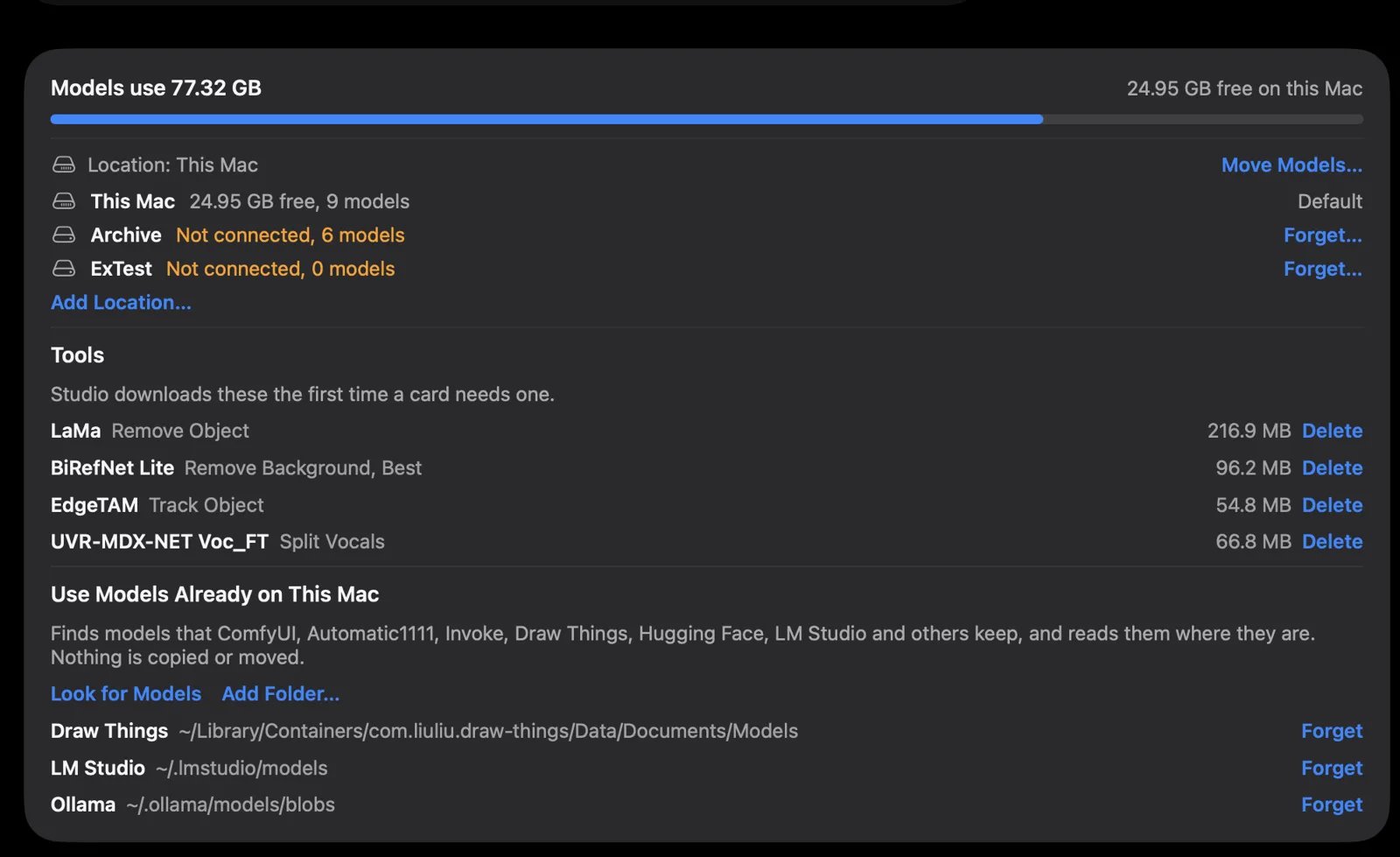
~/.ollama/models/blobs under Use Models Already on This Mac. Screenshot from Outmake, 3 November 2026.Which should you choose?
Ollama
- You want a model server for your editor, scripts, agents or other apps.
- You want open source you can read and build.
- You run Linux, Windows or Docker as well as a Mac, or a Mac on macOS 14 or 15.
- You have an Intel Mac and accept slower, processor-only speeds.
Outmake
- You want to make pictures and short videos as well as chat.
- You want dictation in every app, voices and meeting captions.
- You want to chain steps on a canvas and run them on a schedule.
- You want to know whether a model fits before you download it.
Both are free, so trying both costs disk space and nothing else. Download Ollama · Download Outmake
What this page doesn’t cover
- Speed. We haven’t timed both on the same Mac.
- Ollama’s cloud models and paid plans, which we didn’t use.
- Linux, Windows and Docker, where Outmake doesn’t run.
Questions
- Is Ollama or Outmake free?
- Both are free for models on your Mac, with no account. Ollama sells cloud plans from $20 a month [1]. Outmake has no paid plan.
- Can Outmake use my Ollama models?
- Yes. Outmake reads the model files in Ollama’s folder where they are, so a model you have doesn’t download again. See the guide.
- Can Ollama make pictures on a Mac?
- Not in current versions. Ollama removed its experimental picture making in 0.32.6 on 4 August 2026, and it hadn’t returned by 0.40.14 [6]. On a Mac, Outmake and Draw Things make pictures.
- Is Ollama better for developers?
- Yes. Ollama has an OpenAI- and Anthropic-compatible server, a command line and Docker images [4]. Outmake has no server for other apps.
- Which works on an Intel Mac?
- Ollama, on the processor only [3]. Outmake needs Apple silicon and macOS 26.
Sources
- ollama.com/pricing, read 5 Nov 2026
- github.com/ollama/ollama, read 5 Nov 2026
- docs.ollama.com/macos, read 5 Nov 2026
- docs.ollama.com/llms.txt, read 5 Nov 2026
- github.com/ollama/ollama/releases, read 5 Nov 2026
- Ollama v0.32.6 release notes, read 5 Nov 2026
- docs.ollama.com/llms-full.txt, read 5 Nov 2026
- ollama.com/privacy, read 5 Nov 2026
- ollama.com/blog/image-generation, read 5 Nov 2026
Outmake: release notes, Models on this Mac, privacy policy, press page.
Changes
- 5 November 2026: published.