
The short answer
Pick LM Studio if you want a model server for other apps or your own code, run MLX models, use macOS 14 or 15, or also work on Windows or Linux.
Pick Outmake if you want pictures, video, voices and dictation beside chat, on macOS 26.
You can keep both. Outmake reads the models LM Studio downloaded, so nothing downloads twice.
At a glance
| Outmake | LM Studio | |
|---|---|---|
| Price | Free. No paid plan | Free. Paid plans for cloud models: $20 and $100 a month [1] |
| Source code | Closed | App closed. lms command line and SDKs open (MIT) [2] |
| Macs | Apple silicon, macOS 26 or later | Apple silicon, macOS 14 or later [3] |
| Other systems | None | Windows and Linux [3] |
| Chat engines | llama.cpp (GGUF) | llama.cpp (GGUF) and MLX [4] |
| Pictures and video | Yes, made on your Mac | None found in its docs [5] |
| Voices and dictation | Yes, in the app | In Bionic, its separate agent app [6] |
| Workflows | Yes, a canvas of steps | None found [5] |
| Server for other apps | No | Yes, OpenAI- and Anthropic-compatible [4] |
| Says if a model fits first | Yes, on every model | Partly: a memory estimate before loading [5] |
| Usage data sent | On at setup outside the EU, UK and Switzerland, can be turned off | None, its policy says [7] |
| Version read | 0.8.4, 3 Nov 2026 | 0.4.28, 31 Oct 2026 [8] |
How we compared them
Every LM Studio statement here comes from LM Studio’s own site, documentation, changelog, pricing page and privacy policy, read on 5 November 2026 and linked in Sources. Outmake statements come from its release notes, help pages and privacy policy. The Outmake screenshots are from Dane’s MacBook Pro (M1 Pro, 16 GB).
We haven’t timed the same model in both apps on the same Mac yet, so this page makes no speed claim either way. Both run chat models on llama.cpp. When we time them, the numbers and the method will go here.
LM Studio is built around language models
LM Studio describes itself as a way to “experiment with LLMs on your computer” with a “chat interface and programmable API” [8]. You search Hugging Face from inside the app, download a model, chat with it, and serve it to other software. Its maker also ships Bionic, a separate agent app for open models [6].
Outmake runs chat models, picture and video models, voices for reading aloud, and speech recognition for dictation. Its Models page lists each one with whether it fits your Mac.
Better for chat with the widest choice of language models: LM Studio.
Pictures, video and voice are in Outmake
LM Studio’s documentation has no picture or video generation [5]. Voice transcription and reading aloud are in Bionic, the separate agent app [6].
Outmake makes pictures with models such as FLUX, SDXL, Qwen-Image and Z-Image, edits them (Remove Object, Replace Background, masks), and makes short videos with Wan and LTX. All of it can run on your Mac. Hold the right Option key to dictate into any app, and read text aloud with voices such as Kokoro and Qwen3-TTS.
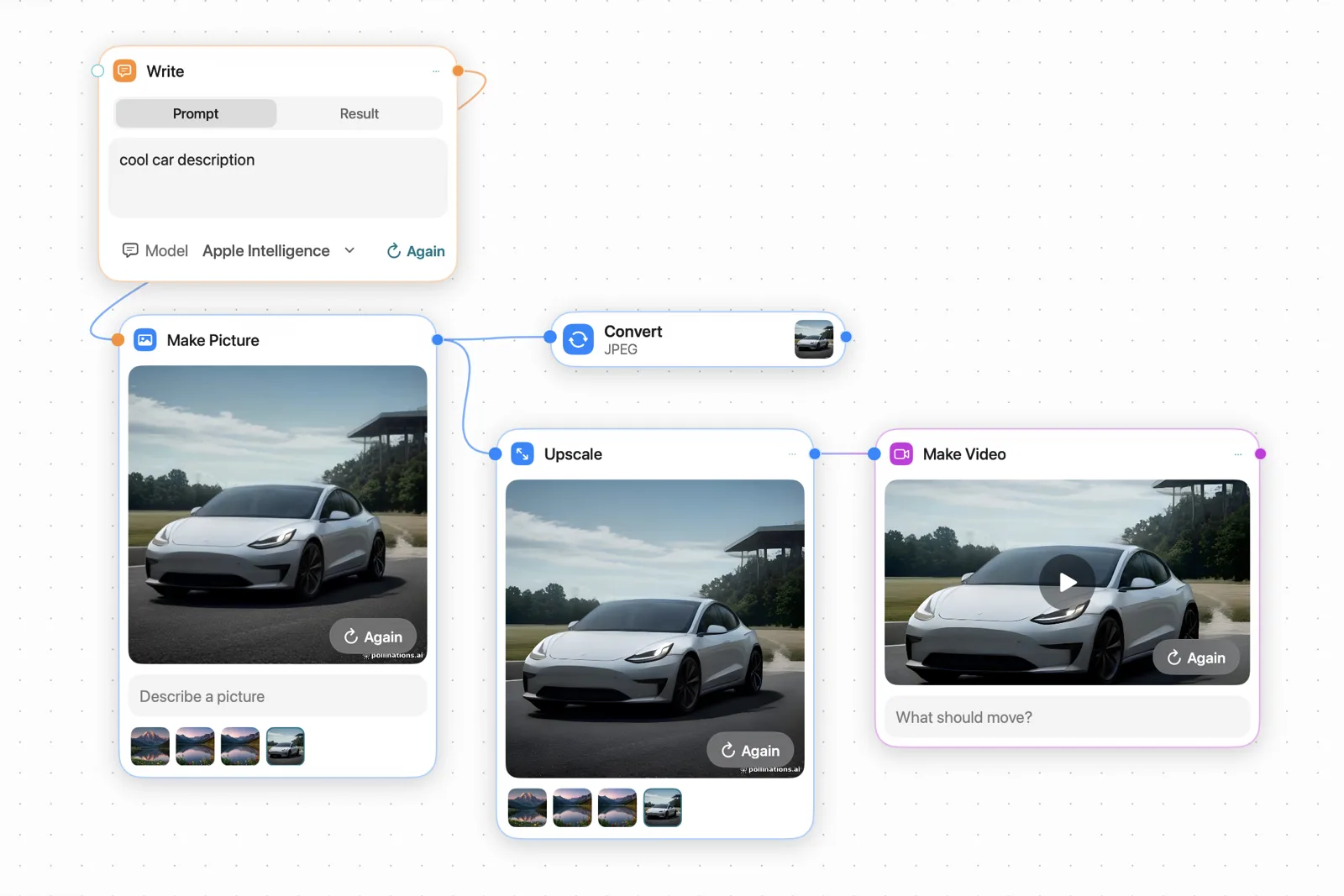
Better for pictures, video and voice: Outmake.
LM Studio serves models to other apps and code
LM Studio runs a local server that speaks the OpenAI and Anthropic APIs, at localhost:1234 by default, so editors, scripts and other apps can use a model you loaded [4]. It has a command line, lms, and a background version, llmster, for servers with no screen [2][8].
Outmake has none of these. Its chat engine listens only on your own Mac, with a key it makes at each launch, and only Outmake uses it. Outmake can go the other way: OpenCode inside Outmake can chat with a model LM Studio is serving.
Better for developers and for other apps: LM Studio.
LM Studio runs MLX models directly
On Apple silicon, LM Studio runs both GGUF models (on llama.cpp) and MLX models, Apple’s own format [4]. Both apps support speculative decoding, where a small model drafts words and the big one checks them.
Outmake runs chat models on llama.cpp with Metal. When a model comes as MLX, Outmake opens the same model in a form llama.cpp runs. If you want to compare a model in MLX and GGUF yourself, LM Studio does both.
Better for MLX: LM Studio.
For an agent on your own models, use Bionic
Bionic, from LM Studio’s makers, runs agents on open models: reading documents, writing code and using your computer [6].
In Outmake, a model on your Mac can’t open files, run commands or go online. Agent work in Outmake goes through Claude, ChatGPT, Gemini or OpenCode, signed in with your own account and paid on your own plan.
Better for local agents: LM Studio’s Bionic.
Outmake says whether a model fits before you download it
Every model in Outmake carries one of four labels for your Mac: Runs great, Runs well, Tight fit or Too big, worked out from its memory and what is running. LM Studio’s documentation advises choosing “a 4-bit option or higher if your machine is capable” and its command line can estimate memory before loading a model [5]. Guides from other sites describe labels on LM Studio’s download list too; we couldn’t confirm them on LM Studio’s own pages.
Better for knowing what your Mac can run: Outmake, on the evidence we could check.
Privacy: LM Studio sends less
Both apps keep chats with local models on your Mac. LM Studio’s privacy policy says “the application does not include telemetry or user-specific tracking”; it receives update checks and anonymized model searches and downloads [7].
Outmake’s Send Measurements and Errors starts on, except in the EU, the rest of the EEA, the UK and Switzerland. It sends your Mac’s chip and memory, model speeds, how often features are used and crash codes, and never what you type or get back. Setup shows the switch before anything is sent, and you can turn it off. The measured speeds it collects are published at outmake.app/measurements.
Better for sending the least: LM Studio.
Price, Macs and age
Both are free for local models. LM Studio’s paid plans, $20 and $100 a month, add cloud models and web search [1]. Outmake has no paid plan; cloud models such as Claude or ChatGPT are billed by those companies on your own plan.
LM Studio needs macOS 14 and runs on Windows and Linux too [3]. Outmake needs macOS 26, so a Mac on Sonoma or Sequoia can’t run it. Neither runs on Intel Macs. LM Studio is at version 0.4.28 with a long changelog [8]. Outmake has been a public beta since 10 October 2026.
Using both
Outmake finds the models LM Studio downloaded and uses them where they are. The setting is in Outmake’s Settings under Models.
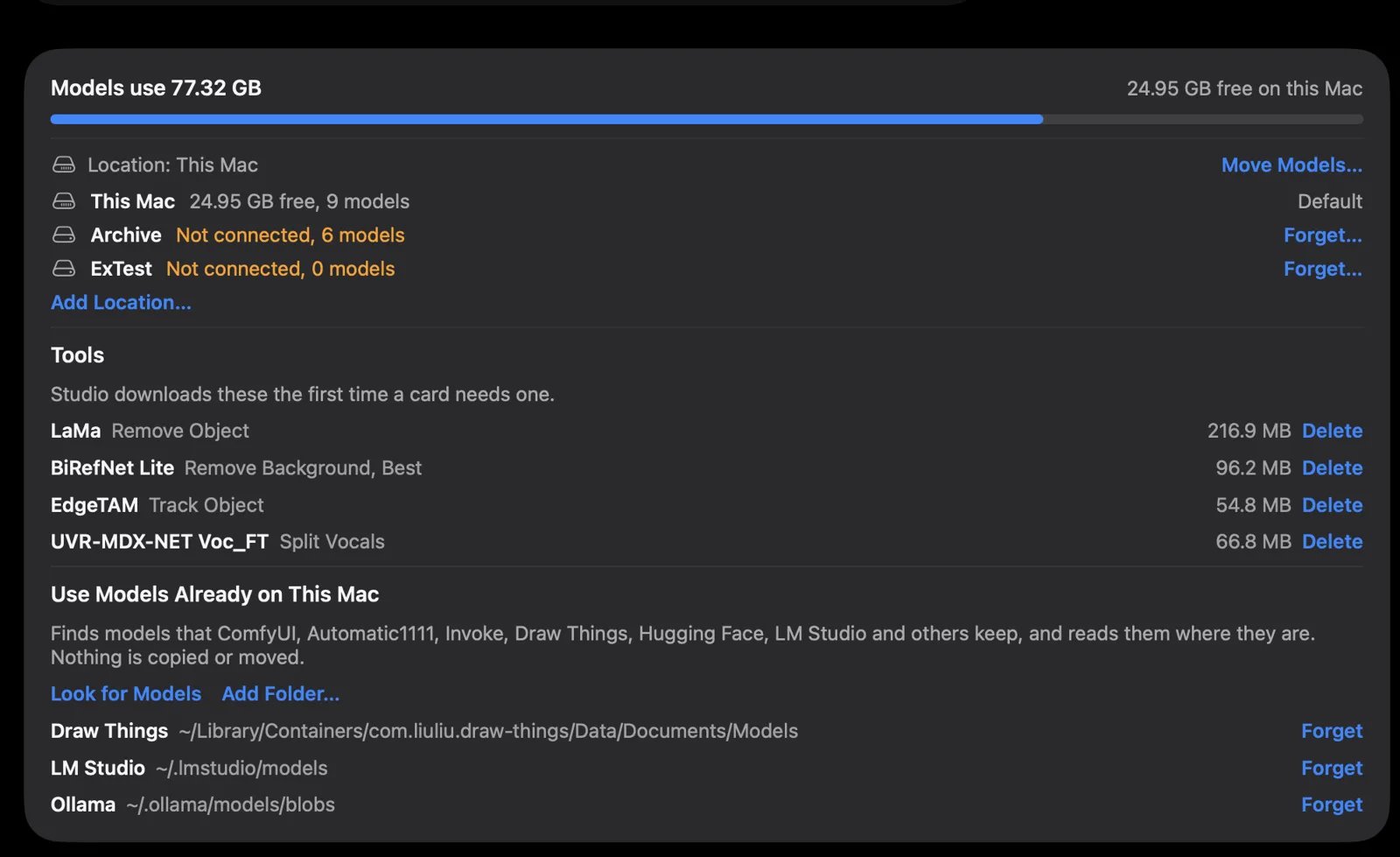
~/.lmstudio/models under Use Models Already on This Mac. Screenshot from Outmake, 3 November 2026.Which should you choose?
LM Studio
- You want a model server for your editor, scripts or other apps.
- You want MLX models, or the newest engines first.
- Your Mac runs macOS 14 or 15, or you also use Windows or Linux.
- You want an agent that runs on your own models (Bionic).
Outmake
- You want to make pictures and short videos as well as chat.
- You want dictation in every app, and voices to read text aloud.
- You want to chain steps on a canvas and run them on a schedule.
- You want to know whether a model fits before you download it.
Both are free, so trying both costs disk space and nothing else. Download LM Studio · Download Outmake
What this page doesn’t cover
- Speed. We haven’t timed both apps on the same Mac.
- LM Studio’s paid plans and Bionic’s agent features, which we didn’t use.
- Windows and Linux, where Outmake doesn’t run.
Questions
- Is LM Studio or Outmake free?
- Both are free for models on your Mac, with no account. LM Studio sells plans for cloud models at $20 and $100 a month [1]. Outmake has no paid plan.
- Can LM Studio and Outmake use the same model files?
- Yes. Outmake reads the GGUF files in LM Studio’s models folder where they are, so a model you have doesn’t download again. See the guide.
- Does either send my chats to the cloud?
- No, for models on your Mac. Both keep those chats on your Mac. A cloud model you choose, such as Claude in Outmake or LM Studio’s paid cloud models, sends that chat to its company [1][7].
- Can LM Studio make pictures?
- Not that we found. LM Studio’s documentation covers language and vision models with no picture or video generation [5]. On a Mac, Outmake and Draw Things make pictures.
- Which works on an older macOS?
- LM Studio. It needs macOS 14 [3]. Outmake needs macOS 26.
Sources
- lmstudio.ai/pricing, read 5 Nov 2026
- lmstudio.ai/app-terms and lmstudio.ai/llms-full.txt, read 5 Nov 2026
- lmstudio.ai/docs/app/system-requirements, read 5 Nov 2026
- lmstudio.ai/docs/app, read 5 Nov 2026
- lmstudio.ai/llms-full.txt and lmstudio.ai/docs/app/basics/download-model, read 5 Nov 2026
- lmstudio.ai and lmstudio.ai/changelog (Bionic), read 5 Nov 2026
- lmstudio.ai/app-privacy, read 5 Nov 2026
- lmstudio.ai/download and lmstudio.ai/changelog/lmstudio, read 5 Nov 2026
Outmake: release notes, Models on this Mac, privacy policy, press page.
Changes
- 5 November 2026: published.