The short answer
Pick Draw Things if pictures are your main work and you want ControlNet, pose, inpainting and outpainting, LoRA training on your Mac, or the same app on iPhone and iPad.
Pick Outmake if a picture is one step among others: a chat, a voice, a video, or a workflow that runs on a schedule.
You can keep both. Outmake reads the models in Draw Things’ folder where they are.
At a glance
| Outmake | Draw Things | |
|---|---|---|
| Price | Free. No paid plan | Free on your device. Draw Things+ $8.99 a month for cloud compute [1] |
| Source code | Closed | App closed. Engine, server and command line open (GPL-3.0) [2] |
| Macs | Apple silicon, macOS 26 or later | macOS 12.4 or later, Intel Macs included [3][4] |
| Other devices | None | iPhone, iPad and Apple Vision Pro [3] |
| Picture controls | Edits, Remove Object, Replace Background, masks | ControlNet, pose, inpaint, outpaint, edit models, infinite canvas [3][4] |
| Video | Wan 2.1, Wan 2.2, LTX-Video | Wan 2.1 and 2.2, LTX-2 with sound, Hunyuan, more [4] |
| LoRA training | No | Yes, on your device [5] |
| Chat, voices, dictation | Yes | No. Chat is in Local Code, a separate app [6] |
| Workflows | A canvas of steps, schedules, ComfyUI files | JavaScript scripts [7] |
| Server for other apps | No | Yes, gRPC and HTTP [7] |
| Usage data sent | On at setup outside the EU, UK and Switzerland, can be turned off | “No third-party analytics”, its policy says [8] |
| Version read | 0.8.4, 3 Nov 2026 | 26.1020.0, 22 Oct 2026 [4] |
How we compared them
Every Draw Things statement here comes from Draw Things’ website, wiki, release notes, privacy policy, Mac App Store page and GitHub, read on 5 November 2026 and linked in Sources. Outmake statements come from its release notes, help pages and privacy policy. The Outmake screenshots are from Dane’s MacBook Pro (M1 Pro, 16 GB).
We haven’t made the same picture with the same model and settings in both apps yet, so this page makes no speed or quality claim. When we do, the pictures, times and settings will go here.
Draw Things gives you more control over a picture
Draw Things has ControlNet, pose, inpainting and outpainting, edit models such as Qwen Image Edit and FLUX.1 Kontext, and an infinite canvas to paint on [3][4]. Its engine is written for Apple chips, with Metal FlashAttention and modes that use the Neural Engine [4][9]. You can train a LoRA, a small add-on that teaches a model a face or style, on your own device [5].
Outmake’s picture tools are fewer: make a picture, edit it with a model such as FLUX.2, Remove Object, Replace Background, Blur Background, masks and Upscale. It can use LoRAs from Civitai, and it doesn’t train them.
Better for detailed picture work and training: Draw Things.
Both make video on your Mac
Draw Things runs Wan 2.1 and 2.2, LTX-2 and 2.3 (which make sound with the picture), Hunyuan and MiniMax H3 [4]. Its FAQ says video needs 16 GB of memory or more [9].
Outmake runs Wan 2.1, Wan 2.2 and LTX-Video. On a MacBook Pro with 16 GB, a two-second clip from Wan 2.2 14B took 12 minutes, by reading the model from disk a part at a time (the guide). Outmake can also send a video to online services from xAI, Google and others for edits, on your own account.
Better for the widest choice of video models: Draw Things.
Outmake does the steps around the picture
Draw Things makes pictures and video. Its maker released a separate open-source app for chat and coding, Local Code, on 28 October 2026 [6].
In Outmake, the picture sits beside chat, voices and dictation. On the canvas, a Write card can describe a picture, Make Picture draws it, Upscale enlarges it and Make Video moves it, and the whole chain can run on a schedule, when a file lands in a folder or from a hot key. Outmake also opens ComfyUI workflow files and runs them on your ComfyUI. Draw Things automates with JavaScript scripts, such as face detailing and upscaling [7].
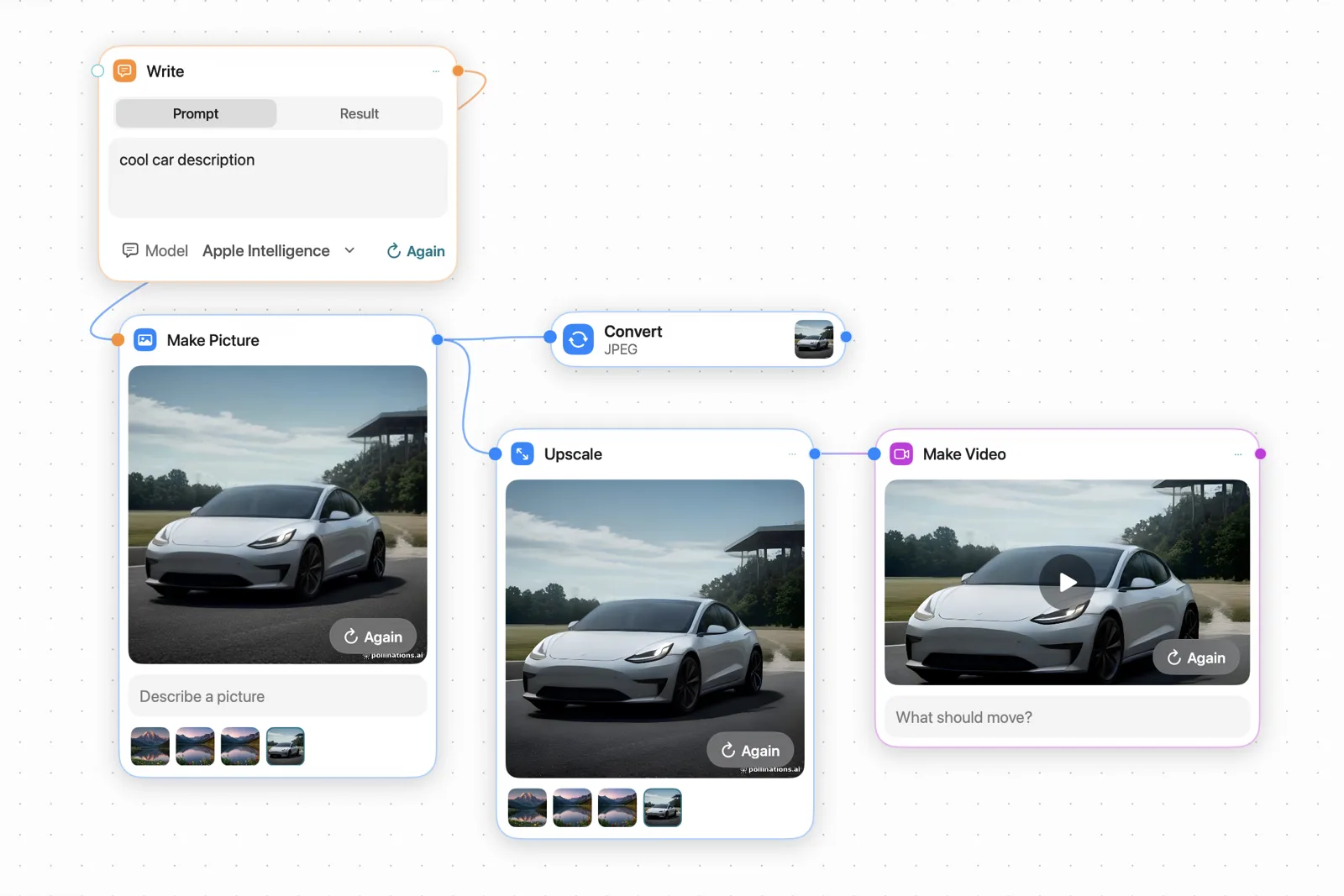
Better for chaining a picture with text, voice and video: Outmake.
Draw Things runs on more devices
Draw Things is on the Mac, iPhone, iPad and Apple Vision Pro, needs macOS 12.4, and supports Intel Macs [3][4]. Server Offload lets one device do the work for another, and its server also runs on Linux with NVIDIA graphics [2][7].
Outmake runs on Apple silicon Macs with macOS 26, and nothing else.
Better for iPhone, iPad and older Macs: Draw Things.
Privacy: Draw Things sends less
Draw Things’ privacy policy says it “uses no third-party analytics or advertising frameworks for tracking purposes” [8]. An account is needed only for its cloud compute.
Outmake’s Send Measurements and Errors starts on, except in the EU, the rest of the EEA, the UK and Switzerland. It sends your Mac’s chip and memory, model speeds, how often features are used and crash codes, and never your prompts or pictures. Setup shows the switch before anything is sent, and you can turn it off.
Better for sending the least: Draw Things.
Price
Both are free for models on your device. Draw Things gives a free account limited cloud compute, and Draw Things+ at $8.99 a month raises the limits [1]. Outmake has no paid plan. Online services you connect, such as fal, bill you on your own account.
Using both
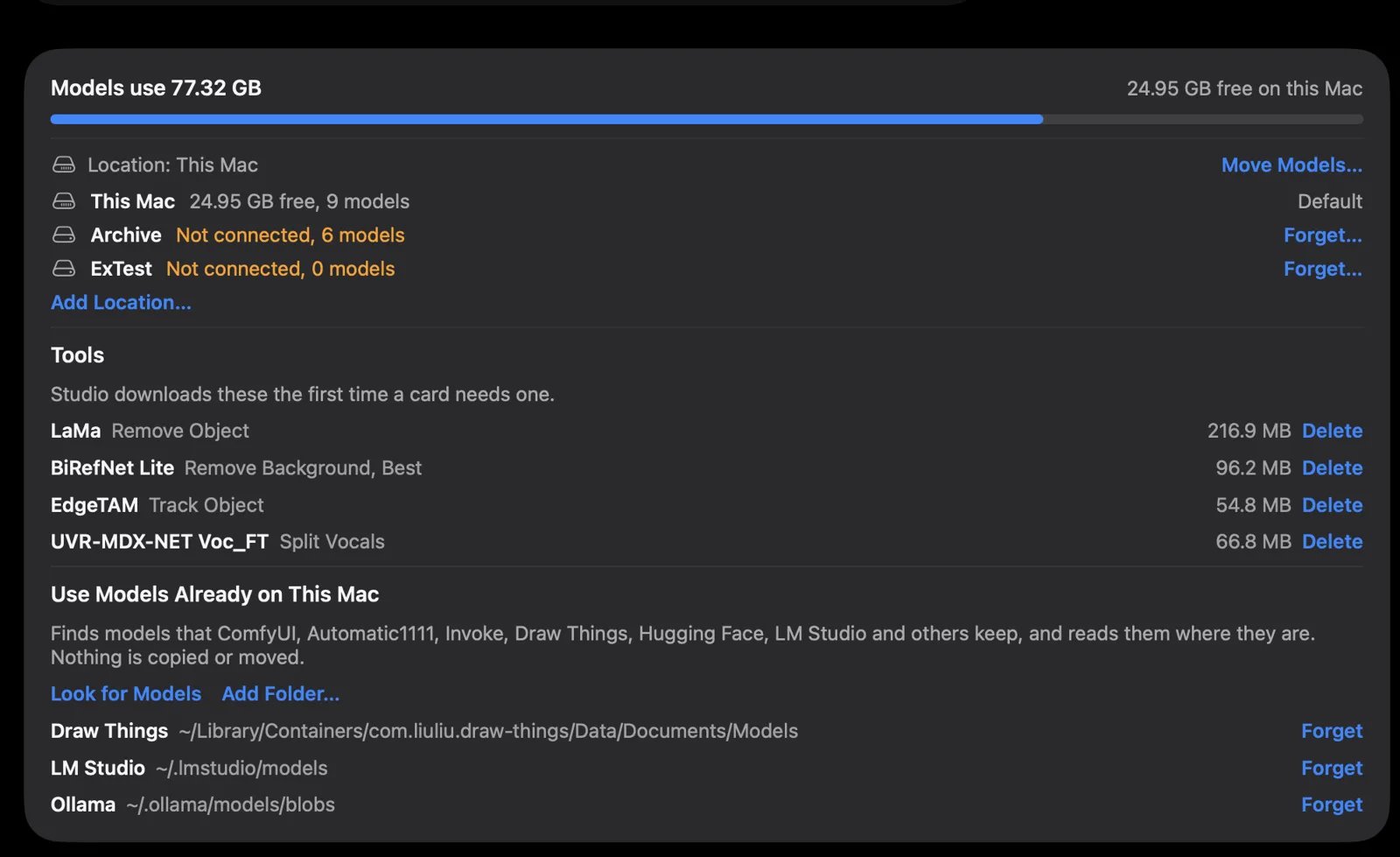
Outmake’s Settings list the folders it reads models from, and Draw Things’ is one of them. In the app’s words, it “reads them where they are. Nothing is copied or moved.”
Which should you choose?
Draw Things
- Pictures are your main work and you want ControlNet, pose, inpainting and outpainting.
- You want to train your own LoRA.
- You want the same app on iPhone or iPad, or your Mac runs an older macOS or an Intel chip.
- You want the widest choice of video models.
Outmake
- You want pictures and video in the same app as chat, voices and dictation.
- You want to chain steps on a canvas and run them on a schedule or from a folder.
- You have ComfyUI workflow files and want to run them from a canvas.
- You want to know whether a model fits your Mac before you download it.
Both are free, so trying both costs disk space and nothing else. Get Draw Things · Download Outmake
What this page doesn’t cover
- Speed and picture quality. We haven’t made the same picture in both apps.
- Draw Things on iPhone, iPad and Vision Pro, and its cloud compute.
- Local Code, Draw Things’ separate chat app.
Questions
- Is Draw Things or Outmake free?
- Both are free for models on your device. Draw Things+ costs $8.99 a month for more cloud compute [1]. Outmake has no paid plan.
- Can Outmake use my Draw Things models?
- Outmake lists Draw Things’ models folder among those it reads, and uses models there without copying them.
- Which is better for Stable Diffusion and FLUX on a Mac?
- For control over each picture, Draw Things: it has ControlNet, pose, inpainting and outpainting [3]. Both run SDXL and FLUX models. Outmake fits better when the picture is part of a longer job.
- Can Draw Things chat like ChatGPT?
- No. Its maker’s chat and coding app is Local Code, released 28 October 2026 as a separate app [6].
- Which works on an Intel Mac?
- Draw Things [4]. Outmake needs Apple silicon and macOS 26.
Sources
- drawthings.ai/pricing, read 5 Nov 2026
- github.com/drawthingsai/draw-things-community, read 5 Nov 2026
- Draw Things on the Mac App Store, read 5 Nov 2026
- drawthings.ai/downloads (release notes), read 5 Nov 2026
- drawthings.ai, read 5 Nov 2026
- Local Code by Draw Things, read 5 Nov 2026
- wiki.drawthings.ai/wiki/Glossary, read 5 Nov 2026
- drawthings.ai/policy, read 5 Nov 2026
- wiki.drawthings.ai/wiki/FAQ, read 5 Nov 2026
Outmake: release notes, Models on this Mac, privacy policy, press page.
Changes
- 5 November 2026: published.